Lift Customer Portal: What a Housing Society Should See
What a Housing Society Should See About Its Lift Without Calling You
By Miss. Nutan Mandal, ElevatorPlus ·
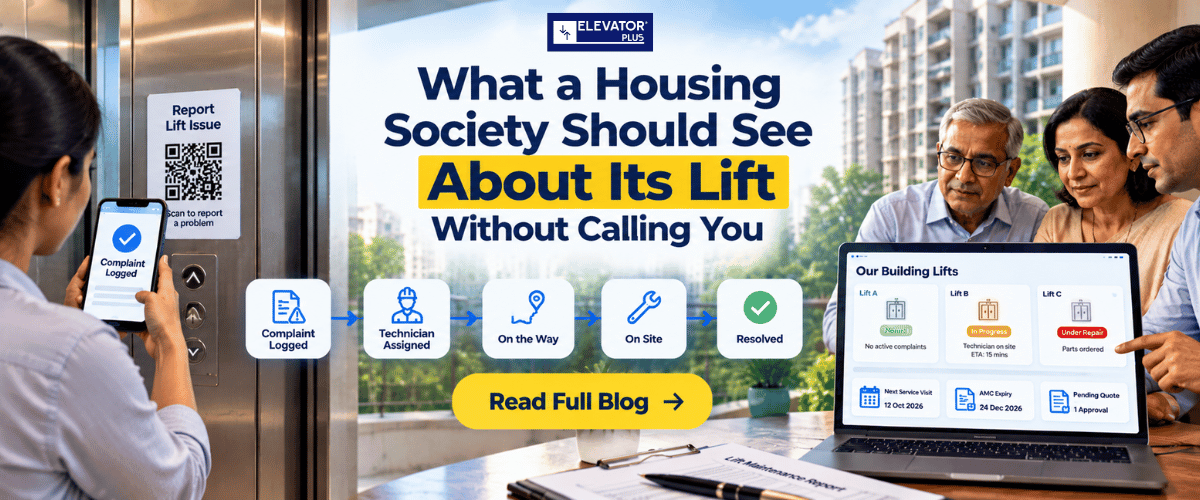
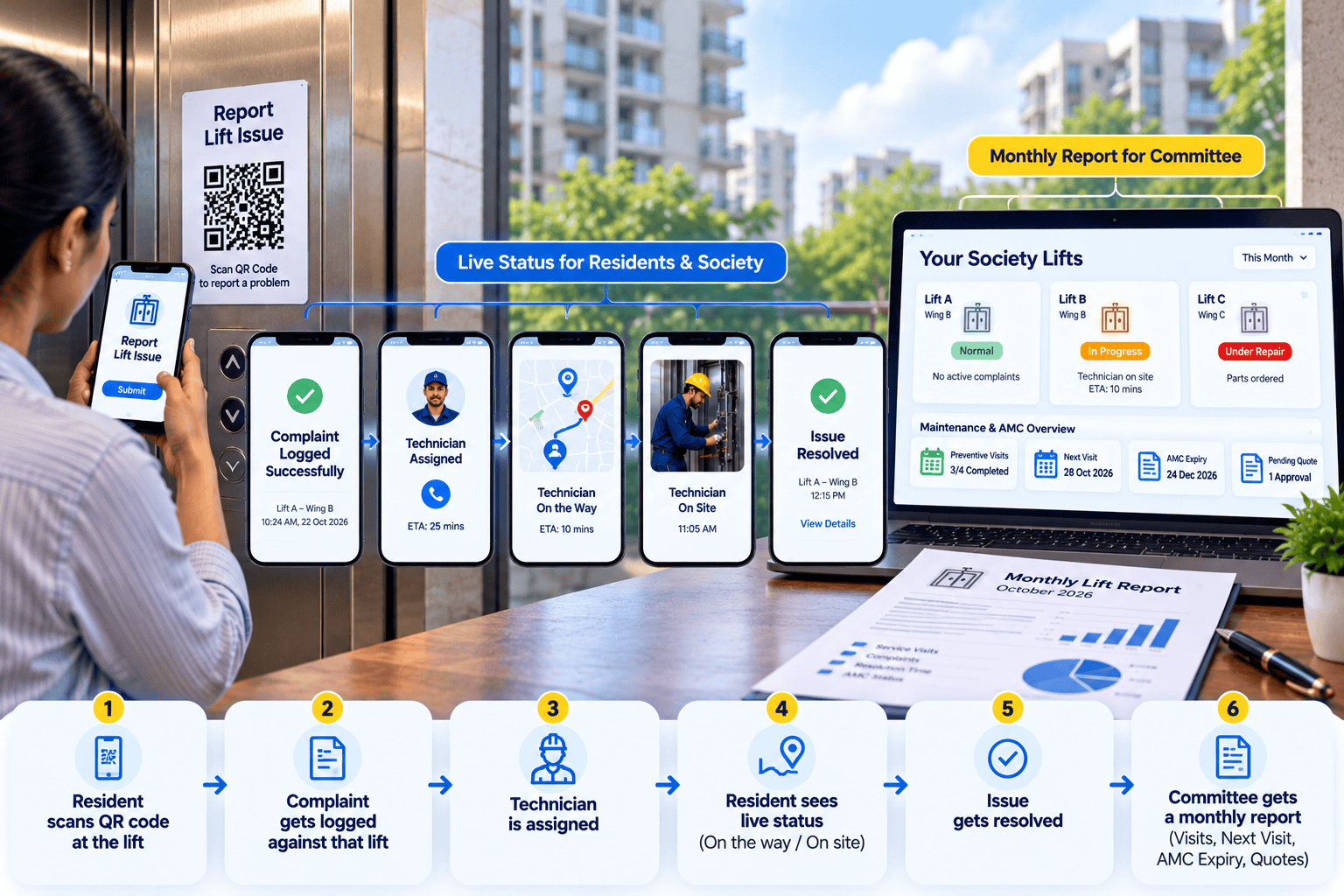
In short: A lift customer portal for a housing society should answer the questions the society calls you about. Live, it should show that a complaint was logged against the right lift, who is assigned, when the technician is on the way and on site, and when it was resolved. The committee should see the ongoing complaints on every lift in the building. Preventive visits, the next visit, AMC expiry and pending quotes go in a short monthly report.
Key takeaways
- Most society calls are status questions. "Has anyone been assigned?" and "When will he come?" do not need a person to answer them.
- Residents should report faults at the lift, not on WhatsApp. A QR code on each lift logs the complaint against that exact lift, with no app and no login.
- The committee wants a record, not a phone call. A building view of the ongoing complaints on every lift, plus a monthly report you share, gives the secretary something to show at the next meeting.
- Some things belong in a monthly report, not a live screen. Visits done, the next visit, AMC expiry and quotes awaiting approval are read once a month.
- Some things the society should never see. Your margins, internal approvals, technician pay and other customers' complaints stay inside your company.
- Your brand should be on everything the society sees. The resident scanning the code should see your logo, not your software vendor's.
What this guide covers: why societies keep calling · what a society should see · how residents should report faults · who in the society sees what · the monthly committee report · what stays internal · how ElevatorPlus handles this · rolling it out · FAQs
Why does a housing society keep calling your office?
Count the calls your office takes from societies in one day. Then sort them by what the caller actually wanted.
In our onboarding work, new faults are usually the smaller share. Most calls ask about a fault already reported: has it been logged, who is coming, when, and is it fixed. Each of those calls takes your coordinator away from assigning the next job.
| What the society says on the phone | What they actually want to know | Where it should be answered |
|---|---|---|
| "We complained this morning, did you get it?" | Was the complaint logged? | Live, the moment it is reported |
| "Who is coming?" | Has a technician been assigned? | Live status |
| "When will he reach?" | Is the technician on the way? | Live status |
| "Is it done? The lift is still making noise." | Was it resolved, and when? | Live status, with the time |
| "This lift keeps failing. How many times this year?" | What is the history on this lift? | Monthly report for the committee |
| "When is your next service visit?" | Is preventive maintenance happening? | Monthly report |
| "Our AMC is ending, what is the plan?" | When does the contract expire? | Monthly report, then a renewal visit |
The first four rows are status. If the society can see status without calling, your phone gets quieter and your coordinator gets back to work.
For the wider picture of what your systems need to do across complaints, AMC and visits, see Elevator Maintenance Software: What It Has to Do (2026).
What should a housing society be able to see about its lift?
Split it into two groups: what changes by the hour, and what changes by the month. The first belongs on a live screen. The second belongs in a report.
| What the society sees | Who in the society asks for it | Live or monthly |
|---|---|---|
| Complaint received, against which lift | Resident, security supervisor | Live |
| Technician assigned | Resident, facility manager | Live |
| Technician on the way, then on site | Security supervisor, facility manager | Live |
| Complaint resolved, with the time | Resident, secretary | Live |
| Ongoing complaints on every lift in the building, with their status | Secretary, chairman, committee | Live, on demand |
| Preventive visits completed this month | Secretary, facility manager | Monthly report |
| Next scheduled preventive visit | Facility manager | Monthly report |
| AMC expiry date | Treasurer, secretary | Monthly report |
| Repair quotes waiting for the society's approval | Treasurer, secretary | Monthly report |
Notice what is missing: nothing on this list needs the society to log in to your system or learn new software. The live items should open from a link or a scan. The monthly items should arrive as a single page.
How should residents report a lift fault?
Today, a resident who finds the lift stuck tells the security guard, posts in the society WhatsApp group, or calls the one technician whose number everyone has saved. None of those creates a record against the lift.
| Channel | What gets recorded | What goes wrong |
|---|---|---|
| Security register at the gate | A line in a book at the gate | Nobody at your office sees it until someone calls |
| Society WhatsApp group | A message among hundreds | No lift ID, no time you can trust, no closure |
| Technician's personal number | Whatever the technician remembers | The complaint leaves with the technician |
| Call to your office | A note by the coordinator | Depends on who picked up and how busy they were |
| QR code on the lift | A complaint logged against that exact lift, with date and time | Needs one sticker per lift and a notice explaining it |
The QR code wins because the lift identifies itself. The resident does not have to know whether it is lift A or lift B in wing C. Scanning the code at that lift tells you.
We go through the wider process of logging, routing and closing complaints in Elevator Complaint Tracking: Breakdowns to Loyalty.
Who in the society needs to see what?
A housing society is not one customer. It is several people with different questions, and they rarely talk to each other before calling you.
| Role in the society | Their question | What to give them |
|---|---|---|
| Resident | Is anyone fixing the lift I reported? | The status of their own complaint |
| Security supervisor | Should I let the technician in, and is he on the way? | Live status, and the technician's name |
| Facility manager | Which lifts have open complaints today? | The building view |
| Secretary or chairman | Is our lift company doing its job? | The building view and the monthly report |
| Treasurer | What are we being asked to pay for, and when does the AMC end? | Pending quotes and AMC expiry in the monthly report |
The secretary is the person who renews your AMC. Give them a record they can show at the committee meeting, and the renewal conversation starts from evidence instead of complaints.
What goes in the monthly committee report?
Keep it to one page. Send it on the same date every month, to the secretary and the treasurer, from your own records.
[Your company logo]
Monthly lift report: [Society name], [Month Year]

1. Lifts covered: [Lift IDs and locations]
2. Preventive visits completed: [Date, lift, technician] for each visit
3. Complaints this month: [Number], all resolved / [Number] open
   For each open complaint: [Lift, date reported, current status]
4. Average time from complaint to technician on site: [Hours]
5. Repeat faults: [Lift ID, fault, number of times this month]
6. Repair quotes awaiting your approval: [Quote number, lift, item, date sent]
7. Next scheduled visit: [Date]
8. AMC: valid until [Date]. Renewal discussion due from [Date].

Ongoing complaints link: [Link]
Contact for this site: [Name, phone]
Line 5 is the one you will be most tempted to leave out. Keep it. If a door operator has failed three times in a month, say so before the society does, and say what you are doing about it.
Line 6 helps you as much as the society. A repair quote that has waited two weeks for the treasurer is now on paper in front of the committee.
👉 Could your society customers see their own complaint status today without calling you? See how the QR customer portal works →
What should a society never see?
Openness has limits. Some information is yours, and some belongs to other customers.
| Keep internal | Why |
|---|---|
| Your margins and part costs | The society sees the price, not your cost |
| Internal approvals and discussions | Who approved a discount is your business |
| Technician pay, attendance and expenses | Staff data, not customer data |
| Other societies' complaints | Another customer's record is never shared |
| Draft quotes not yet approved internally | A draft that reaches the customer becomes the price |
A portal built for lift companies should make this easy. The society sees its own lifts and its own complaints. Everything else stays in your back office.
How ElevatorPlus handles this ?
The customer portal in ElevatorPlus starts with one QR code per lift, printed with your branding. A resident or the security supervisor scans it and reports the fault. There is nothing to download and no login to hand out. The complaint is logged against that exact lift, with a date and time.
The person who reported it can come back and see where it has got to: reported, assigned, on the way, on site, resolved. Every complaint carries a timestamp, an assignment, an attendance and a resolution. If the same lift has more than one problem, the customer can add several issues against one complaint, for example a noisy door and a jerky stop, instead of raising three separate complaints.
For the committee, the portal shows the ongoing complaints on the building's lifts and the status of each one. The portal is available to every ElevatorPlus customer, in every market, not only in India.
The society sees your company, not ours. Your logo appears on the login screen, inside the app, and on the customer complaint portal.
The portal does not show visit history or AMC expiry. The monthly items, such as visits completed and AMC expiry, go to the society in a report you share, built from your records in ElevatorPlus. AMC management reminds your team 60 days, 30 days and 1 day before each AMC expires, so the renewal line in the report is never a surprise to you.
How do you roll this out in a society?
Introduce it in one society first, then repeat.
| Step | What to do | Who does it |
|---|---|---|
| 1 | Put a QR sticker in or beside every lift, one code per lift | Your technician, at the next visit |
| 2 | Put a short notice in the lift lobby: scan to report a fault | Your technician, with the secretary's permission |
| 3 | Tell the security supervisor how it works and what they will see | Your technician or site coordinator |
| 4 | Send the building view link to the secretary and facility manager | Your office |
| 5 | Ask the secretary to post the notice in the society WhatsApp group | The secretary |
| 6 | Send the first monthly report at month end | Your office |
Expect a few weeks of overlap. Some residents will still call. Answer them, and remind them that the code at the lift is the faster way.
Frequently asked questions
1. What should a housing society see about its lift?
Live: that a complaint was logged against the right lift, who is assigned, when the technician is on the way and on site, and when it was resolved. Monthly: visits completed, the next visit, AMC expiry and quotes awaiting approval.
2. How should residents report a lift fault?
By scanning a QR code on the lift. The complaint is logged against that exact lift with the date and time, without an app or a login.
3. Does a housing society need to download an app to report a lift fault?
Not with a QR complaint portal. The resident scans the code at the lift and reports the fault on their phone, with nothing to download.
4. What should a monthly lift report to a society include?
Lifts covered, preventive visits completed, complaints and their status, repeat faults, repair quotes awaiting approval, the next visit and the AMC expiry date.
5. What should a lift company not share with a society?
Margins and part costs, internal approvals, technician pay and attendance, other customers' complaints and draft quotes not yet approved.
6. Whose branding does the society see on the portal?
In ElevatorPlus, the lift company's. Your logo appears on the login screen, inside the app, and on the customer complaint portal.
7. Does a customer portal reduce calls to the office?
It removes the status calls, because the society can see where a complaint has got to. Calls reporting genuinely new problems still come in, as they should.
📲 Join our WhatsApp channel for compliance tips, updates: ElevatorPlus - Business Automation Tool
A society that calls you three times about one complaint is not being difficult. It has no other way to find out what is happening.
Give it one. Put a code on every lift, show the status live, and send the committee a single page every month. Keep your costs, approvals and staff data inside.
The payoff is not only a quieter phone. It is a secretary who walks into the renewal meeting holding your record, not a list of complaints.
👉 Find out how many of your office calls are status questions. Book the Revenue Leak Walk-Through →
Related reading
- Elevator Complaint Tracking: Breakdowns to Loyalty
- Reduce Elevator Breakdown Response Time: 2026 Guide
- How QR Codes Boost Elevator Business Efficiency & Profit
- Elevator Maintenance Records in India: What You Must Keep
- AMC Renewal: Stop Losing Lift Contracts at Expiry
About the author. Miss. Nutan Mandal is the Team of ElevatorPlus, the Elevator Business Operating System used by 200+ elevator companies across 20+ countries.
Sources: Drawn from ElevatorPlus onboarding work with 200+ elevator companies across 20+ countries.
👉 Follow ElevatorPlus on,
Instagram LinkedIn Facebook YouTube Qoura Substack Twitter