
Powering Elevator Businesses Worldwide
Trusted by Fastest-Growing Elevator Companies
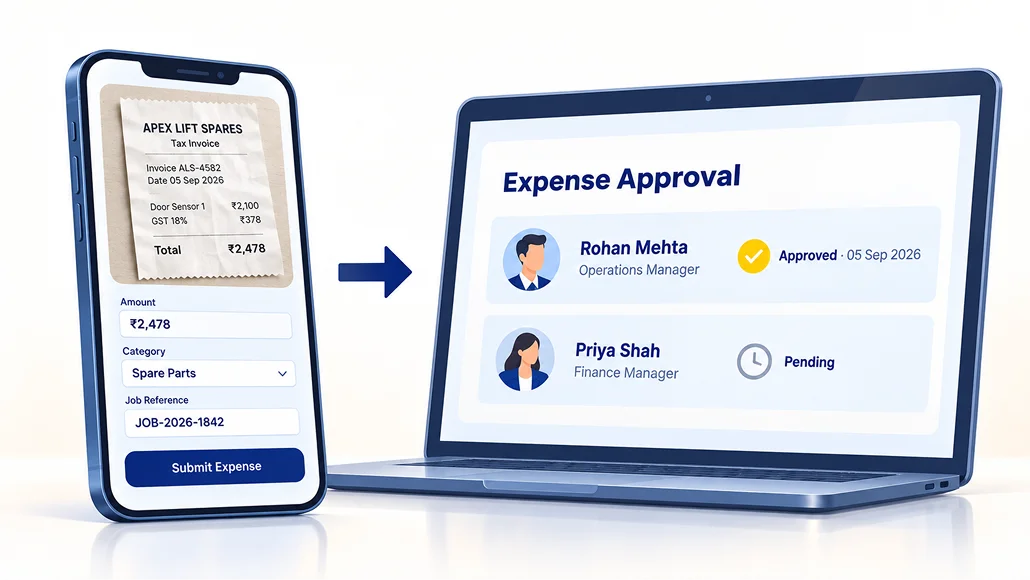
A technician takes a taxi to an emergency callback at nine at night. He photographs the receipt, submits it from the app before he leaves the site, and goes home. His manager approves it the next morning from a screen. Nobody stands outside the accounts department asking whether it has gone through.
And because that expense is attached to the job it was incurred on, you can answer a question most elevator companies cannot: is this contract actually making money?
Trusted by Fastest-Growing Elevator Companies
In most elevator companies, a technician's expenses go like this. He pays for fuel, a taxi, a meal on a long day, a small part bought locally because the branch was out of stock. He keeps the receipts in his wallet. At the end of the month he fills a form, staples the receipts to it, and hands it to somebody in the office. Then he asks about it. Then he asks again.
Two things happen. The good technicians stop claiming small amounts because chasing is not worth the aggravation, which quietly makes their real pay lower than you think it is. And your accounts team spends days each month deciphering handwriting and matching faded receipts to jobs that finished six weeks ago.
Neither problem is about money. Both are about the process being manual, and both are entirely fixable.
The good technicians stop claiming small amounts because chasing is not worth the aggravation, which quietly makes their real pay lower than you think it is.
Your accounts team spends days each month deciphering handwriting and matching faded receipts to jobs that finished six weeks ago.
The technician opens the app, photographs the receipt, picks a category, and attaches it to the job he is standing on. That is the whole submission. It happens while he is still at the site, not from memory three weeks later.
Because the claim carries the job, the site and the date automatically, there is nothing for anyone in the office to reconstruct. And because the receipt is a photograph rather than a piece of paper in a van, it does not fade, tear or go missing.
Every claim routes to whoever should approve it, based on how you have set it up. That can be by designation, so all technician claims go to the branch service head, or by reporting line, so each person's claims go to their own manager. Larger amounts can require a second approval above them.
The approver sees the receipt, the amount, the category, the job and who submitted it, on one screen, and approves or rejects with a reason. The technician sees the status change without asking anyone.
This is the part your field team will notice first. Nobody follows up with HR. Nobody stands in the accounts department. The claim was submitted from a site, approved from a phone, and is now sitting in the reimbursement run.

"Material requisitions handling bahut easy ho gayi. Technician request deta hai, main approve kar deti hoon. No more WhatsApp pe messages dhundna."
Sanket Ningure
Technician claims are one half of it. The other half is everything the office books directly, and in ElevatorPlus all of it goes to the same place.
A breakdown callout, a repair, a modernisation task. Travel, labour paid outside, a part bought locally, a crane hire.
Everything spent servicing that contract across the year, so the annual cost of holding it is visible against what it earns.
Site expenses, transport, subcontractor payments, incidentals, all against the project rather than into a general pot.
Office rent, utilities, staff travel that is not job-specific, marketing, anything that belongs to the business rather than to a project.
The distinction matters. A cost booked to a project tells you something. A cost booked to "miscellaneous" tells you nothing, and most elevator companies have far too much in that column.
Ask most elevator company owners which of their AMCs are profitable and you will get an instinct rather than a number. The instinct is usually right about the worst one and wrong about everything else.
The reason is not carelessness. It is that the information lives in four places. Parts are in the stores register, technician time is in a supervisor's head, travel is in a monthly reimbursement claim, and the contract value is in an invoice. Nobody has the time to assemble that per contract, per month, across two hundred lifts.
When material issued and expenses booked both attach to the project they belong to, that assembly happens as a by-product of ordinary work. Cost against contract value, per contract, without anyone building a spreadsheet.
What owners tend to find: a handful of contracts are being serviced at a loss and have been for years, usually old ones that were never escalated. A few sites consume far more travel than their value justifies. And one branch is quietly more profitable than the rest for reasons worth copying.

Claims arrive dated, categorised, photographed and attached to a job, throughout the month. There is no pile of paper to process in the last week.
Everything approved is already coded. The run is checking and paying, not deciphering.
Filterable rather than assembled. The question "what did we spend on travel in the Pune branch last quarter" takes a moment rather than a morning.
ElevatorPlus is not an accounting platform and does not try to be. Tally integration is live with customers today, and QuickBooks, Xero and others connect through our open API.
See all integrationsCan technicians submit expenses from the field?
Yes, from the mobile app, with a photographed receipt attached. It can be done on site, before they leave.
How does the approval work?
Claims route automatically to the right approver, either by designation or by reporting manager, depending on how you configure it. The approver sees the receipt, amount, category and job on one screen and approves or rejects with a reason. The technician sees the status without having to ask.
Do technicians have to follow up with HR or accounts?
No. That is the point of it. The status is visible in the app from submission through to approval.
Can we book expenses against a specific job or contract?
Yes. Against a job, an AMC or preventive maintenance project, an installation project, or as a general business expense.
Can we see whether an individual contract is profitable?
Yes. Material issued and expenses booked both attach to the project, so cost against contract value is visible per contract.
Does it replace our accounting software?
No. ElevatorPlus is not an accounting platform. It connects to the one you already run. Tally is live with customers today, and QuickBooks, Xero and others connect through our open API.
Can we set spending limits by category?
Yes, and claims above a threshold can be routed for a second approval.
What happens to a rejected claim?
The technician sees the rejection and the reason, and can resubmit with a correction. Nothing disappears silently.
Bring a contract you suspect is underperforming and we will show you how the cost of servicing it would look once material and expenses are booked against it. Most owners are surprised by at least one.