
Powering Elevator Businesses Worldwide
Trusted by Fastest-Growing Elevator Companies
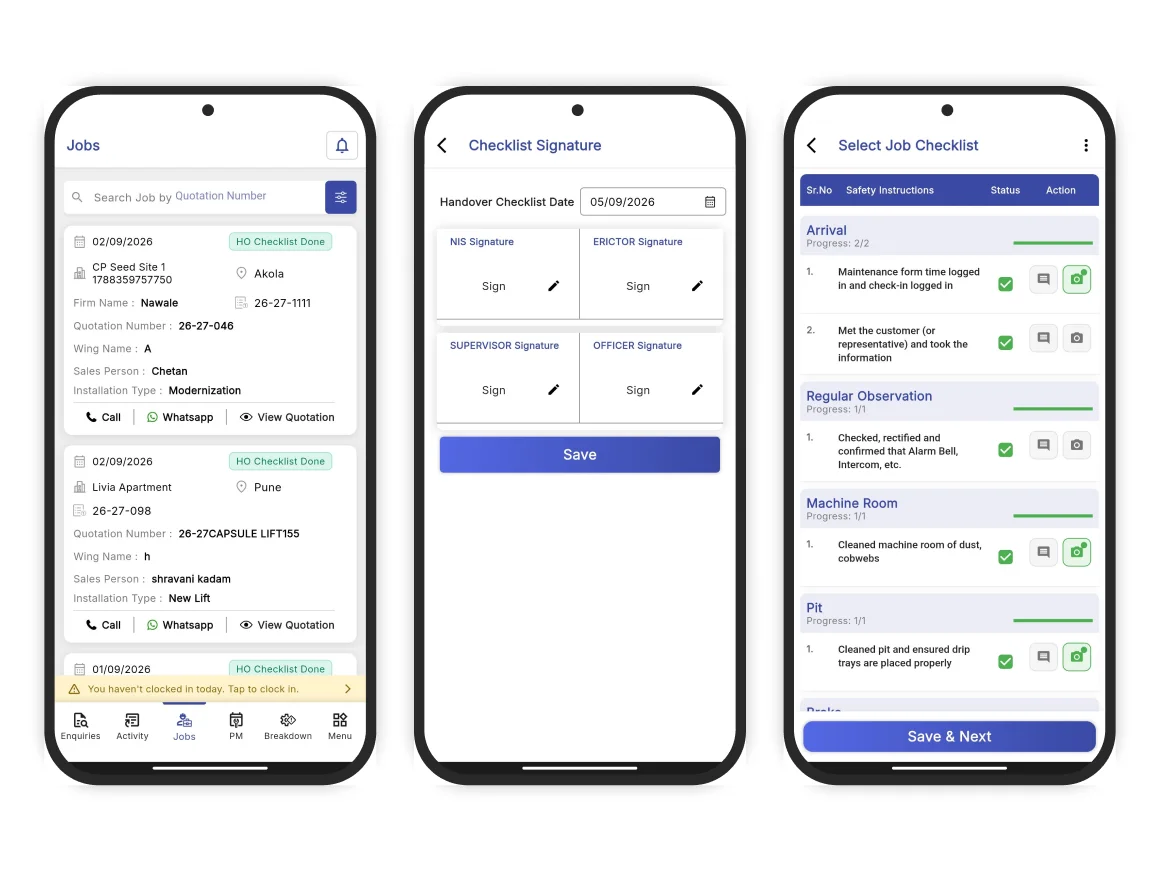
Machine rooms, pits and basement plant areas have no reception. That is where your technicians spend their day, and it is where most field service apps stop working. The ElevatorPlus app runs completely offline. A technician opens the job underground, works through the checklist, photographs what they found, takes the customer's signature and closes the visit. It syncs the moment the phone finds a connection.
Trusted by Fastest-Growing Elevator Companies
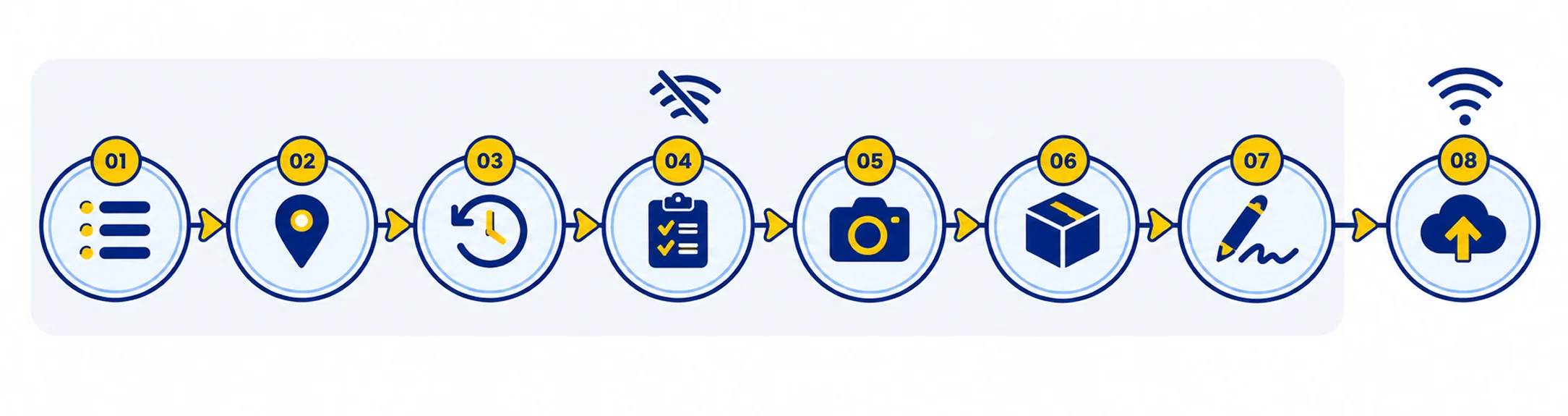
This is one preventive maintenance visit, from arriving on site to the customer getting their report. Nothing here needs a connection until the last step.
Every job assigned to them, in route order, with the site address and the reason for the visit. Downloaded before they left the office.
Geo-tagged, timestamped. The office knows they arrived without anyone making a phone call.
Every previous breakdown, every PM visit, every part changed, going back as far as the record goes. A technician standing at a lift they have never seen before knows what the last three people found. This is the difference between diagnosing a fault and rediscovering it.
The PM checklist for that lift type, item by item. Nothing gets skipped because nothing can be marked complete until it is answered.
A worn rope, a damaged door shoe, a machine room that needs cleaning. Attached to the job, not lost in a WhatsApp group.
The part goes onto the job and onto that lift's permanent record, so whoever attends the site next can see what was changed and when.
On the phone, on the spot, alongside a selfie that records the technician's live location and time. Proof of attendance that nobody can dispute at renewal.
The moment the phone finds signal, everything uploads. The service report is emailed to the customer automatically and locked, the office sees the job closed, the stock is updated and the visit is billable.
Steps one to seven happen with the phone in aeroplane mode. Step eight is the only one that needs a connection, and it happens by itself.
Plenty of field apps say they work offline and mean they will show you a cached job card. The technician can read it but cannot change it, and everything they do on site still goes onto paper.
ElevatorPlus is offline in the sense that matters. The full job opens, the checklist is answerable, photographs attach, the signature captures, the parts entry works, and the visit closes. The record is created on the device and lives there until it can be sent. Nothing is lost if the phone runs out of battery on the way back to the van, and nothing is lost if the technician does not open the app again until the next morning.
"The app works even with slow internet which is important because I work at sites where network is not always good. Job details load fast, and I can also update the job when internet comes back. The checklist feature helps me make sure I don't skip any step during preventive maintenance."
Ganesh Budgude
"Network problem is common at lift sites inside buildings. This app works well even with low internet. I can update job status and it syncs when network comes back. Very practical design for field use."
Amit Pawar
| Platform | Who uses it & what it does |
|---|---|
| Android | For technicians in the field. Full offline capture. Rated 4.7 on Google Play. |
| iPhone & iPad | For owners, managers and anyone who prefers iOS. Rated 4.7 on the App Store. iPad supported. Requires iOS 14 or later. |
| Web console | For the back office. Any modern browser, nothing to install. |
| Desktop app | Install to your desktop straight from the browser. Windows, macOS, Linux, same application. |
ElevatorPlus is one Flutter application, and the desktop interface is purpose-adapted rather than a stretched phone screen. Whatever operating system your office runs, it installs and works.
There is no installer to hunt for and no IT ticket to raise. Open ElevatorPlus in any browser, click install, and it runs on the desktop like any other application. Windows, macOS or Linux, same application, same data.
A technician closes a job on an Android phone in a basement and the coordinator sees it the moment it syncs. There is no separate mobile database and no export step. The web admin panel is a distinct product for back-office reporting and configuration.
The cloud platform is built on NestJS and React. Media is stored on Amazon S3. A named, modern stack you can look up in under a minute.
The applications are written in Flutter, which is why one codebase runs on Android, iPhone, iPad, Windows, macOS and Linux rather than four separate half-maintained builds.
ElevatorPlus ships a minimum of twelve releases a year and every one reaches every customer at no additional cost. The Android and iOS apps are updated on the same release.
Both apps are published under Accucia Softwares Private Limited. We publish this because "modern" and "legacy" are words anyone can use about anyone. A named stack, a public store listing and a visible release history are things you can check in about a minute.
Live tracking and geo-tagged attendance, and what that means on iOS versus Android.
Live technician location and distance travelled on Android, configurable to your own SOP. Some companies want it on for every technician every day. Others switch it off entirely. It is a setting, not a condition of using the product.
How field tracking worksMark-in and mark-out are geo-tagged on both Android and iOS, so attendance and site arrival are recorded without a separate app or a register at the gate. Travel distance is captured automatically for travel-allowance settlement.
Location tracking depends on the permissions the technician grants and on the operating system. Apple restricts background location more tightly than Android does, so the live tracking view is an Android capability. We would rather you knew that now than found it in week three.
"Route planning made my mornings so much easier. I know which sites to visit before I even start my day. Service history of every lift is right there - no need to call office and ask. Simple interface, loads fast, works well on the field."
Nitin Sataredkar
Every visit produces a record the customer can see: what was checked, what was found, what was replaced, who attended, when they arrived and when they left, with photographs and a signature. The service report is emailed automatically when the job closes.
You can require a photograph before a job can be closed. On or off, per your SOP. Some companies need photographic evidence on every visit. Others work in sites where photography is restricted. Both are supported, which is why it is a setting rather than a rule.
Twelve months of dated, photographed, signed service records is the most persuasive thing you can put in front of a building committee questioning your AMC price. See how AMC management works.
"Before ElevatorPlus, we used to fill paper job cards and hand them over to the office. Many times papers got lost or details were unreadable. Now everything is digital. I fill the job card on the app after completing the work, customer signs digitally, and the office immediately gets the update. Our customers also feel more confident when they see the digital process."
Granthraj Kharat
A technician who half-understands a checklist fills it in badly, and your data quality is downstream of that. The best rope-and-controller man in your team may not read English, and that should not decide whether he can use your software.
The ElevatorPlus app runs in 18 languages, and so does the web admin panel. Every string is translated and verified against the actual language. This is not Google Translate sitting on top of an English product.
See all 18 languagesWhen a job closes, the service report goes to the customer automatically. When a fault is logged via QR code, the building manager tracks it in a portal branded to your company. Your technicians never type our name to get to the app, and your customers never see it either.
How the customer portal worksRated 4.7 on Google Play and 4.7 on the App Store. These are from the public listings and you can read the rest yourself.
"I have been in the elevator service field for 8 years. This is the first app made specifically for elevator companies. Earlier everything was on paper, job cards, parts used, complaint details. Now I fill everything in the app and it saves automatically. My supervisor can also see the update without me calling."
Vishal Ausare
"Material requisitions handling bahut easy ho gayi. Technician request deta hai, main approve kar deti hoon. No more WhatsApp pe messages dhundna."
Sanket Ningure
"Route planning made my mornings so much easier. I know which sites to visit before I even start my day. Service history of every lift is right there - no need to call office and ask. Simple interface, loads fast, works well on the field."
Nitin Sataredkar
"Attending breakdown calls has become easier. You can find the lift model, warranty status, and previous complaint history before even arriving on site. No more calling the office to inquire."
Ragini Puranik

"Earlier, it was impossible to know where our technicians were during the day. We had delays, missed jobs, and no visibility. ElevatorPlus gives us real-time location tracking, and we can now assign jobs based on who's closest. It's reduced client complaints big time."
Rapid Rise Elevators
"Completing the service for clients generating service reports and marking attendance has become much easier with ElevatorPlus."
Rahul Dubey
A field app only earns its keep if technicians use it every day. Most do not get used, and the reason is almost always the same: it stops working in the one place the work happens.
When the job card is filled in on site, it describes what happened. When it is filled in that evening from memory, it describes what the technician remembers. Those are different documents, and only one of them is any use in a dispute.
Coordinators spend a large part of their day ringing technicians to ask where they are and whether the job is done. When mark-in, job status and closure are visible on a screen, that phone call stops being necessary.
A part logged on site is deducted from stock and tied to a job. A part remembered later is a discrepancy at the next stock count.
Twelve months of dated, photographed, signed service records is the most persuasive thing you can put in front of a building committee questioning your AMC price. It is very hard to assemble that from paper job cards after the fact.
Does the app work with no internet connection?
Yes, completely. A technician can open a job, work a full checklist, capture photographs and a customer signature, log parts used and close the visit with no signal at all. Everything syncs automatically when the device reconnects. This matters because machine rooms, pits and basements rarely have reception.
Is there an iOS app?
Yes. ElevatorPlus is live on the Apple App Store and on Google Play. The iOS app supports iPhone and iPad and requires iOS 14 or later.
What happens if a technician's phone dies mid-visit?
The work already entered is stored on the device and is still there when the phone restarts. Nothing is held only in memory.
Can we require a photograph before a job is closed?
Yes, if you want to. It is a setting rather than a fixed rule, so companies that need photographic evidence on every visit can enforce it, and companies working in sites where photography is restricted are not forced into it.
Does location tracking work on iPhones?
Live technician location and distance travelled is an Android capability. Apple restricts background location access more tightly, so the live tracking view is not available on iOS. Geo-tagged mark-in and mark-out work on both platforms.
What languages does the app support?
18, in both the mobile app and the web admin panel. Every string is translated and verified rather than machine-translated. See all 18 languages.
Can a technician see the history of a lift they have never worked on?
Yes. Every previous breakdown, preventive maintenance visit and part changed is on the lift record, and it opens on the phone before they start.
How often is the app updated?
A minimum of twelve releases a year, usually more. The Android and iOS apps are updated on the same release.
The quickest way to judge a field app is to watch someone use it with the connection switched off. Book thirty minutes and ask us to do exactly that.